Deploying RSA signed-applet with JavaPlugin1.2.2
M. Gallant 09/24/1999
The procedures here describe the steps taken to deploy an RSA signed-applet
with the JavaPlugin1.2.2. For more details see:
DEPLOYING RSA SIGNED APPLETS IN JAVA TM PLUG-IN
- Write the Java applet in Java1.1 or Java2. Do not use any Netscape or
Microsoft specific security APIs. If you have an applet already developed for
Netscape code-signing and the Netscape JVM, remove all security calls
like PrivilegeManager.enablePrivilege("UniversalPropertyRead").
Similarly for any Microsoft specific security call (developed for Authenticode, for example).
- Compile the code with your favorite Java compiler as usual.
- Use the Netscape Signtool utility
to sign and JAR the
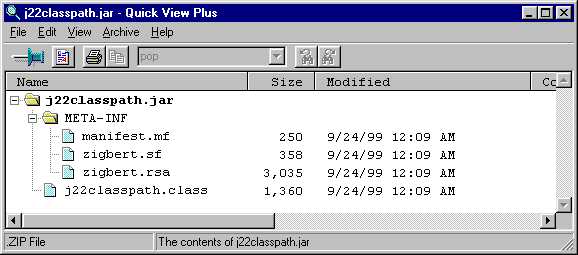
classes (in the example, only one class file j22classpath.class). The Netscape-style
JAR archive contains the signers public certificate, the java class file(s), signatures
and hash values of the contents. If you need to understand the details, see
the Netscape Signtool1.1 Documentation and the
Netscape JAR Format.
The contents of the JAR file for the simple example here looks like:
- Write the simple html page which will contain the signed applet:
<applet code="j22classpath.class" archive="j22classpath.jar" width=600 height=300>
</applet>
- Modify the html to specify using the JavaPlugin1.2.2 (which uses Sun's JRE1.2.2)
either manually, or using the convenient
Plugin 1.2 htmlConverter.
When this is done properly, the html code will look something like this:
<!--"CONVERTED_APPLET"-->
<!-- CONVERTER VERSION 1.0 -->
<OBJECT classid="clsid:8AD9C840-044E-11D1-B3E9-00805F499D93"
WIDTH = 600 HEIGHT = 300 codebase="http://java.sun.com/products/plugin/1.2.2/jinstall-1_2_2-win.cab#Version=1,2,2,0">
<PARAM NAME = CODE VALUE = "j22classpath.class" >
<PARAM NAME = ARCHIVE VALUE = "j22classpath.jar" >
<PARAM NAME="type" VALUE="application/x-java-applet;version=1.2.2">
<COMMENT>
<EMBED type="application/x-java-applet;version=1.2.2" java_CODE = "j22classpath.class" java_ARCHIVE = "j22classpath.jar" WIDTH = 600 HEIGHT = 300 pluginspage="http://java.sun.com/products/plugin/1.2/plugin-install.html"><NOEMBED></COMMENT>
</NOEMBED></EMBED>
</OBJECT>
<!--
<APPLET CODE = "j22classpath.class" ARCHIVE = "j22classpath.jar" WIDTH = 600 HEIGHT = 300 >
</APPLET>
-->
<!--"END_CONVERTED_APPLET"-->
- Put this modified html page and the signed JAR file in the same deployment directory and test. When
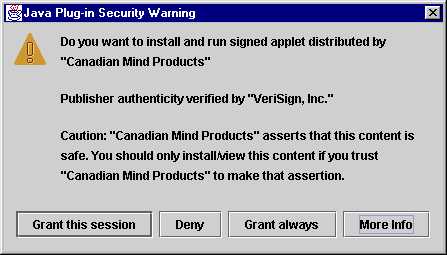
the page is loaded in either Netscape Communicator or Internet Explorer, you should see this type of
"grant privileges" security window from the JavaPlugin1.2.2. Note that for RSA signed applets and
the JavaPlugin1.2.2, the privileges granted are "all or nothing":
 .
.
You should be able to examine details of the signer's certificate ("More Info" button):
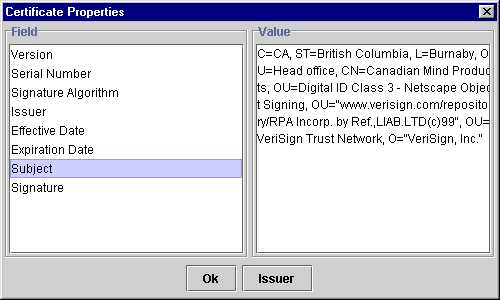
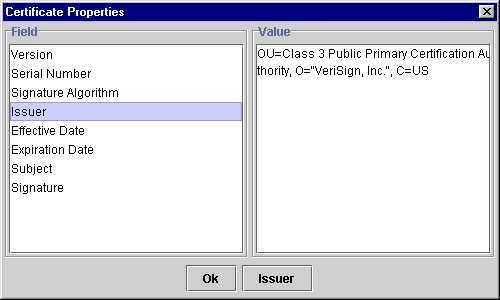
and also the certificate issuer's (CA) certificate. provided that it is recognized
by the Microsoft cryptoAPI cert. database:
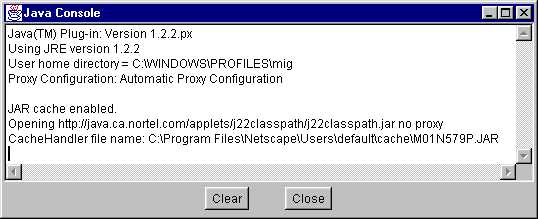
- If you have the JavaPlugin1.2.2 java console enabled, you should see something like
this when the page is first loaded:
--------- Note on disabling RSA signed applet security with JavaPlugin1.2.2 ---------
With JavaPlugin1.2.2 and RSA signed applets, the client's local policy file is
checked to see if there is a usePolicy entry under RuntimePermission. If
usePolicy is found, then the fine-grained privileges present in the client's policy file
are invoked (along with the default system policy "sandbox" security).
If usePolicy is *not* found, then the RSA signed applet is granted all privileges
(like a Java application) if the user selects "Grant this session" in the Java Plug-in Security Warning
dialog.