WebPager Usage Notes
© M. Gallant 02/12/2001
WebPager is a standalone Java application for win32
requiring a client JVM (Java Virtual Machine) version 1.1+
to execute. There are two equivalent executables:
- webpager.exe
- webpager.jar
webpager.exe is a win32 executable, which can be run
on any win32 platform with IE4 or higher (which provides the
JVM). To use, download webpager.exe, save in a local folder,
create a simple text file called urlist.txt containing
a list of web-page addresses (one per line). Start by
double-click the webpager.exe icon.
To view the digital signature, right click and select
Properties/Digital Signatures/
webpager.jar is a JAR (Java ARchive) which can be run
directly on systems with Sun J2SE1.2+ installed. To use,
download webpager.jar, save in a local folder,
create a simple text file called urlist.txt containing
a list of web-page addresses (one per line). Start
execution by either double-clicking, or by executing:
java -jar webpager.jar
Configuration
LOCAL mode:
When Webpager is launched, a GUI is displayed, which is initially
in the LOCAL mode of operation (i.e. will ignore remote
connections). The localhost IP address and corresponding fully-qualified domain
name is conveniently displayed in the lower part of the window.
A green light flashes in the title
section of Webpager when a url is being loaded locally.
The status TextArea at the bottom should indicate
that the WebPager server has started successfully.
On startup, webpager looks for a file urlist.txt
in the current directory, and if present, will parse the text file
for simple url entries (one per line). These urls are loaded into
the application and are available via the slide buttons (Forward etc..),
or via the drop-down list "Select a URL:". A new list of urls can
be loaded at any time with the "Load List" button.
Alternatively, urls can be loaded in manually by entering the url
into the "Show URL" text field. This field also serves to indicate
the url of the current slide selected.
The AutoShow button starts the timed slide show presentation (which runs
through all the slides just once). The "Time:" text-field specifies
the slide timing in milliseconds. The "Slide" label indicates
the current slide number (starting at 0).
REMOTE mode:
Clicking the MODE button toggles from LOCAL to REMOTE mode. In
REMOTE mode, a win32 machine connected to the Internet, or an
intranet, can "page" one or many win32 machines, provided the machines are
in remote mode. A red light flashes in the
title section of Webpager when a url is being remotely received.
Initially, all remote hosts are not trusted, except for those in the
trustlist.txt file, which, if found, is read and parsed at startup.
On receiving a WebPager connection, an untrusted remote host causes a
security dialog to be displayed:
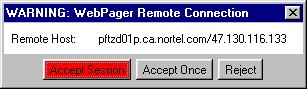 The user has a choice to Accept Session in which case WebPager
saves the remote machine address for the session (until WebPager is closed).
Choosing Accept Once will not store the remote host address, and the dialog
will appear again for each subsequent connection. Selecting Reject does nothing
except log the access attempt. To include a new remote host name in the
trustlist.txt file, the file must be manually edited.
Navigation is exactly as in LOCAL mode.
The user has a choice to Accept Session in which case WebPager
saves the remote machine address for the session (until WebPager is closed).
Choosing Accept Once will not store the remote host address, and the dialog
will appear again for each subsequent connection. Selecting Reject does nothing
except log the access attempt. To include a new remote host name in the
trustlist.txt file, the file must be manually edited.
Navigation is exactly as in LOCAL mode.
RECIPIENTS:
The Remote Host:
text field specifies the target machine host IP address (or dns name).
In addition, a "multi-peer" recipient list can be specified in a
file named tolist.txt. If a file with this name is found at
startup in the current directory, it is loaded and parsed as one
remote host name (IP or domain name) per line. In remote mode,
all recipients on the list are "paged".
In REMOTE mode, the sending machine receives status information
including the url sent and remote machine name selected, and any problems
associated with finding the target machine, or making that connection.
The recipient machine(s) receive status information
including the sending machine host name and remote port and url sent.
The ClearTrust button clears the internal session trusted-list of
remote hosts. The ShowTrust button lists the trusted remote hosts in the
log TextArea. Recipient machines can receive connections from any host
(running WebPager) at any time.
A recipient machine in *LOCAL* mode will log access attempts, but will not
respond.
Technical Details:
The client IP address or host can be displayed via:
- Win95, 98 : winipcfg.exe
- NT4, Win2000 : ipconfig /all
Note that when WebPager starts, the status area should display a
confirmation line indicating that the server has started properly. The
port used by WebPager is 7171. If there is another service running
on this port, WebPager will not execute properly. To examine all
the running services on Win95, NT4 or Win2000 run:
netstat -a