WebImager.hta Application
M. Gallant 07/02/2002
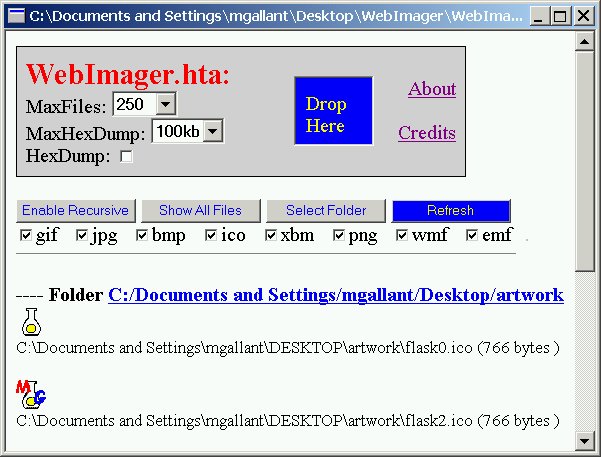
WebImager.hta is an HTML application using VBScript to display all images
within folders dragged onto the WebImager.hta icon, a folder dragged into the "Drop Here"
dropbox within the application, or a folder selected from the file
dialog within the application. The hta application hosts a signed Java applet to add
"hex-dump" functionality of ANY clicked file, if the HexDump checkbox is
checked. The applet also provides "pixel-grabber" capability for gif and jpg files.
The hex-dump is displayed in a separate window in the same format as
the win32 debug.exe native command, with 16 bytes per line and 8 lines per
block (128 bytes per block). The maximum number of hex-bytes dumped can be adjusted
with the MaxHexDump selection (default is 10 kb). If greater than the file size, the entire
file is HexDumped. Otherwise, only the specified number of bytes is read and displayed.
For 800 MHz Pentium III, performance of hexdumping is ~ 100 kbytes/sec.
Supported image types are
gif, jpg, ico, bmp, png, wmf, emf, xbm
Non-image files can optionally be listed as well.
Folders can optionally be fully recursively searched. The file path and
size is also displayed. Maximum number of listed items (folders and files) is
set at 250, but can be changed with the MaxFiles dropdown selection. Checkboxes
show which image types will be displayed. To filter image types, uncheck boxes
and click the Refresh button.
Click any listed file-path to launch the file-type associated application (note that with
Show All Files selected, .exe files will be immediately launched with a single click).
Ctrl+Click any displayed file-path and the
file's context menu Properties panel is immediately launched.
Click any displayed image to see a popup message with image properties listed, including
the clicked pixel-color for gif or jpg images.
The clicked image is highlighted temporarily with a black border to show the
image boundary.
[Note: The Select Folder button, and Properties features only work on
win32 systems with shell32.dll version 4.71 or higher. The application first detects the OS, and
if Win9x, ME or NT4, checks the shell32.dll version. If version < 4.71 the button and Properties
features are disabled (i.e. Active Desktop not configured). For IE version < 5.5, the "Drop Here"
region does not automatically refresh the display when an item is dropped there,
and the Refresh button must be clicked.]
To Use:
Download the WebImager.hta application, and run directly to automatically start the embedded
Java applet. Alternatively, download and save both WebImager.hta and hexdumperapplet.cab to
the same directory and start WebImager.hta.
You must grant the requested privileges in the security dialog to have the hexdumper functionality.
If this is the first time you have run WebImager.hta, you will be prompted with a
dialog to configure the .hta file type dropHandler which adds an
extra registry setting enabling drag & drop of files/folder onto any .hta file.
After this is done, access the WebImager.hta download link again. (in some cases you may need to restart
Windows for the change to take effect).
 WebImager.hta
 hexdumperapplet.cab
Screen shot
References: